
QtWeb Internet Browser3.7.5 - Download
You'll be able to download in few seconds.
Publisher Description
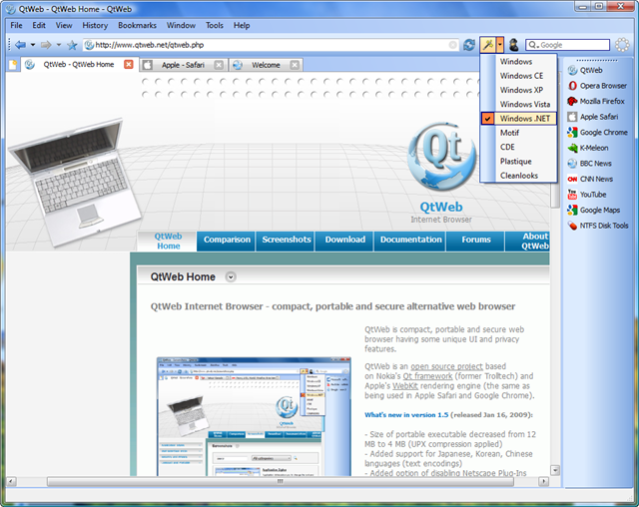
QtWeb is a fast, secure, compact and portable web browser with some unique user interface and privacy features. QtWeb is free, non-commercial and open source project based on Qt framework and WebKit rendering engine (used in Safari and Chrome). Customizable User Interface: Change Application Style on the fly, and see how the program and websites look under different versions of Windows and Unix environment; Customize web search providers, menu titles, assign hot keys and shortcuts; Tabbed interface. Can be switched to non-tabbed. Privacy and Security features: Turn on Private Browsing mode to avoid leaving traces of browsing, even UserAgent which is being sent to the web server is masked; Full Reset feature - clears all caches and restores all local settings to the state just after installation, as it was never run on the machine; Supported SSL to access secure sites. Certificate information and certification path can be displayed. Lightweight, fast and portable browser: Size of executable is 6MB only, no additional DLLs or other files required; Command Line Scripting supported; Can be run in limited Windows environment (WinPE), like Active@ Boot Disk, or BartPE running from CD or USB; Web Inspector allows to view and inspect HTML elements, debug JavaScripts, view loading time and profile resources. Built-in Torrent client allows to download files via fastest torrents protocol.
About QtWeb Internet Browser
This Browsers program is available in English. It was last updated on 29 September, 2026. QtWeb Internet Browser is compatible with the following operating systems: Linux, Mac, Other, Unix, Windows, Windows-mobile.
The company that develops QtWeb Internet Browser is QtWeb.Net. The latest version released by its developer is 3.7.5.
The download we have available for QtWeb Internet Browser has a file size of 7.3 MB. Just click the green Download button above to start the downloading process. The program is listed on our website since 2012-02-17 and was downloaded 0 times. We have already checked if the download link is safe, however for your own protection we recommend that you scan the downloaded software with your antivirus. Your antivirus may detect the QtWeb Internet Browser as malware if the download link is broken.
How to install QtWeb Internet Browser on your Windows device:
- Click on the Download button on our website. This will start the download from the website of the developer.
- Once the QtWeb Internet Browser is downloaded click on it to start the setup process (assuming you are on a desktop computer).
- When the installation is finished you should be able to see and run the program.
Program Details
System requirements
Download information
Pricing
Version History
version 3.7.5 build 100
posted on 2012-02-17
- Qt Framework is upgraded to the latest v.4.7.5; - Farsi language added; - Context menus improved; - Linux & Unix support added; - OpenSSL is updated to 1.0.0b; - Web Page Search re-implemented; - HTML5 Local Storage configuration added;
version 2.0
posted on 2009-03-23
- Customizable menus, hot keys, keyboard shortcuts, toolbar buttons and search providers
- Web Inspector
- Virtual Keyboard
- Command Line Scripting
- Print Preview
- Separate Privacy top-level menu
- Icons and Menu Bar can be hidden
Disclaimer
External Download
We do not host QtWeb Internet Browser on our servers. We did not scan it for viruses, adware, spyware or other type of malware. This app is hosted by the software publisher and passed their terms and conditions to be listed there. We recommend caution when installing it.
The external download link for QtWeb Internet Browser is provided to you by apps112.com without any warranties, representations or guarantees of any kind, so access it at your own risk.
If you have questions regarding this particular app contact the publisher directly. For questions about the functionalities of apps112.com contact us.
